Understanding Amazon Connect Call Center Pricing!

Amazon Connect Basic Pricing Model

Even the most hostile competitor will grant that Amazon has changed the pricing game in call center technology.   “No license fees” and “pay only for what you use” are compelling strategies that would stop a man on a galloping horse!   Amazon typically summarizes the cost of its Connect call center as consisting of three components; the service usage charge, the cost of a ten digit voice number and the cost per minute of using that voice number.

Pricing Examples

An end-customer calls using an Amazon Connect US toll-free number in the US East (N. Virginia) region, answered by an agent on the Amazon Connect softphone. The call lasts 7 minutes.  There are 3 separate charges that apply for this call:

1. There is an Amazon Connect service usage charge, based on end-customer call duration. At $0.018 per minute * 7 minutes = $0.126

2. There is the day charge for use of the US toll-free number. At $0.06 per day * 1 day = $0.06

3. And there is an inbound call per minute charge for US toll-free numbers. At $0.012 per minute * 7 minutes = $0.084

So the total for this call is $0.27 (plus applicable taxes, fees, and surcharges).

This cost analysis is accurate but assumes that your call center is an isolated model with no integration with any other AWS Service.   Optional services, used to enhance your Call Center functionality and improve the customers experience have additional charges that are not reflected in the basic price example above.   To get a more accurate picture of the true cost of a call center we need to make some assumptions as to how an average call center is configured, noting the various service that may be required to implement the requirements of that call center.   Then we can look at the additional service costs and improve our understanding of the true cost of an Amazon Connect Call Center.

Real World Call Center Requirements

Let’s take a look at several very basic, yet very real world call center requirements and then evaluate the cost of the additional services.

  • Custom Call Routing

    • Most if not all call centers have some kind of call routing algorithm that usually require and external computational resource in the form of a database and the code or application that evaluates the database information.   For example, assume that we want to route calls based on the callers possible location using the Area Code displayed in the incoming caller ID.   Additionally, let’s assume that we want to evaluate the callers relationship with our company be determining if they are a new customer or an existing customer.  In both cases we would be looking up the callers incoming phone number in an external database to resolve either or both of these questions.  We would route the caller to the Agents that handle New  York, or route the caller to Agents that handle new customer or existing customers.   There would be any number of technical solutions for implementing this caller lookup, but for purposes of discussion, let’s just assume we will not spin up a Windows SQL Server in an EC2 instance, but use AWS Serverless solutions that include a DynamoDB table and some Lambda functions to operate on that data!
  • Holiday and “Ad Hoc” Closings

    • Call Centers operate on dynamic schedules that very often impact the handling of inbound calls.   Are we open or closed sounds like a simple decision, but it does require some additional “belts and suspenders” to get an answer to that question.   If we close on Holidays, we will need to reference list of days we are closed (read: database).   Some call centers enable supervisors to temporarily close a customer service queue for a team meeting.  Depending on the sophistication of this feature the supervisor might also create a custom prompt to be played to the caller during the team meeting.
  • Real Time Queue Metric Displays

    • Again, call centers typically display the status information of the various customer service queues that comprise the call center.   We want to know how many folks are waiting in each queue, how long they have been waiting and highlight the caller that has been waiting the longest.  When we answer a call we update that data set and when we terminate that call we update that dataset again.    Agents often want to see the status of their supervisor and team mates.  Are they “talking”, “idle” or in some “release” state?   AWS Connect has a library of API’s to help with the analysis of this information but it will require additional services to make use of that information in a way that has a positive impact on the call center stake holders.  (Read: Kinesis streams, DynamboDB and Lambda functions).
    • Perhaps you will want to run these recordings through transcription and translation services.  AWS has some exciting NLP and AI options that will impact that call center in astonishing ways.  Imagine English Call Center Agents being able to interact with Spanish, French or Chinese speakers!  Transcribing speech in realtime and popping agent prompts or recommended responses based on sentiment or key words used by the caller are all viable options within the AWS service stack available to an AWS Connect Call Center.
  • Logging & Recordings

    • Call Centers typically record phone calls for a variety of compliance and service improvement. Those recordings need to be stored somewhere along with your real time contact record trace logs (Read: S3 bucket).
  • Voice Analytics 
    • AWS has a service LENS which provides transcriptions of voice recordings and applies sentiment analysis on that recording.  Usually a third party provider in other solutions but now included in Amazon Connect with an additional charge.
  • Single Sign-on Options for Agent Login/Out

    • Cognito, SSO with SAML or other authorization options.
  • Custom Agent Dashboard and Real Time Display

    • Most folks will find the CCP or softphone that comes standard with your AWS Connect instance to be very useful for basic answer, transfer, hold and consult operations.  Getting additional information displayed to the agents however may require additional desktop display options.   For example, how do you retrieve and playback those phone call recordings?   Do Agents need to add a “disposition code” at the end of a phone call?   How is the queue and agent team status information displayed to the agents?  Do Agents work with channels other than voice?  Do they handle Text messages?   Chat sessions?  Social Media messaging?     This options will require an Agent interface that can display this information and enable the agent to interact with these other channels.

Real World Call Center Example

Granted the above requirements are very basic, but they are representative of the type of services that a call center would expect to be available and they also have additional service charges not covered in the basic AWS Connect Pricing Example we listed above.   Let’s take a real world call center example and then apply the additional charges that would be incurred if we were to implement the above requirements.    In this example we are drawing from an actual day in the life of an actual call center that is considering migrating to AWS Connect.

Daily 70 Agent Call Center Utilization:

  • Inbound Phone Calls for the day: 4959
  • Average Call Handling Time: 7 minutes per call
  • Total Minutes of use: 34714 minutes or 578.5 Hours
  • Base AWS Cost $624 (assume telephone carrier costs the same across all competing options and are not included)
  • Base Annualized assuming 261 working days = 9M Minutes or $163,086.00 per year in AWS Connect Usage Charges

Additional Service Costs

The most costly services in this very simple example would be DynamoDB and Lambda.    DynamoDB pricing has several components; the size of the Table for data storage (.25GB), DynamoDB Streams, Read ($0.09 per RCU-month),  Write Requests ($0.47 per WCU-month).   The pricing for Lambda is far from simple: A free tier followed by $0.20 per million requests plus $0.00001667 per GB-second of ‘compute time’ used per month plus the cost of the API Gateway or streams.Each incoming phone call will result in:

  • Lambda Call to DynamoDB Table for Routing Information
  • Lambda Call to DynamoDB Table to determine Possible closing
  • Lambda Call to DynamoDB Table to add caller to Queue count and update display
  • Lambda Call to DynamoDB Table to remove Caller from Queue and display when call answered
  • s3 Storage increase of 7 Minute recording Object (.023 per GB)
  • s3 Storage increase for Logs and Contact Trace Records (.023 per GB)
  • Agent Login/Out Call to Cognito or SSO SAML provider (.15 per 10000 sync operations)
  • Summary –
    • >19K Lambda Calls per day, 5M  per year
    • >19K DynamoDB Read Requests
    • >19 DynamoDB Write Requests

Other important service considerations

Advanced functionality like Natural Language Processing, Speech Recognition, Transcription, Translation, Voice Analytics, Workforce management, Polly and LEX are some of the other services that you will undoubtedly make use of in your call center design.  These will all be billed as AWS line items outside of the Connect usage charges.    The above Basic functionality Example is probably adding an additional $25 a day or $6K a year to the cost of an Amazon Connect Call Center based on the above call center stats!

Clearly, unless you have a team of software engineers on your staff that understand these AWS service in addition to their coding skills, you are going to need design and implementation expertise.

Again, though pricing can get complex and often has many components that are not easy to identify like data transfer, encryption and acceleration it is all more than manageable and very cost effective.   In fact all of the above functionality could be included in the use of a custom dashboard from Dextr.Cloud which would give the Agents and Supervisors all the real time status information they require, enable agent to agent chat, email, text, supervisor alerts, monitoring and coaching and a growing list of new features as the product development map unfolds!  This functionality could be fixed for a modest charge of $69 a month per simultaneous agent access.   Small price to pay for that list of feature, would you agree?


SUMMARY of COST CONSIDERATIONS

We see five areas for understanding Amazon Connect:

(1) Carrier cost = DNIS/800 as published generally .03 center per day for a DID number and .06 cents per day for a toll free number/

(2) usage cost for using the carrier per published price generally .0022 for DID and .012 for toll free

(NOTE – the above charges would be required of any solution you are considering, generally AWS will be less costly however)

(3) .018 connect minute service amazon connect  you are billed from the time call comes in to your call center until it terminates.  It does not matter how many agent you have as you do not pay for agent licenses as is the case with the usual cloud call center providers.

(4) other AWS services like chat (.004),  LEX (4000 speech requests estimate .004 per request or $16 ; lambda ( 1 Million request free per month then .00000002083 per request) /dynamoDB  (https://calculator.aws/#/)  and other service they may use like S3 for storage etc. (5) dextr (.003 per logged in minute)(edited)

We have an AWS Pricing Calculator that can help you with these more advanced calculations, just give us at call at 844-4-DrVoIP and we will make it available to you.   We can provide you with seats in our demo call center if you would like to try both Dextr and AWS or we can build you a proof of concept call center in your AWS account for a modest fee, or you can take up to five seats in our demo center, with your own dedicated greeting and phone number!


IT First Responder SMS Hotline!

If you work in an enterprise IT environment as a team member you know the drill for a system down emergency. Someone alerts someone that the users are unable to access the Corporate Intranet! Panic! A ticket is initiated at the corporate help desk, and a phone call is made to the IT Director who then needs to figure out if we are having a sever failure, network failure or application failure.

The CEO, now getting phone calls from the operating executives, has now called the CIO who in turn is beating up on the IT Director and stuff starts to roll downhill. Somebody sends out a group conference line, the email stream starts up and all hands on deck are scrambling to identify the root issue.

I find the email route is just to confusing and nobody knows what the current status is as people chime in on the email, adding input and more times than not, asking for updates to pass up the line. Trying to work an issue with an open conference bridge is not real helpful and some folks did not get the email that has the conference bridge line number so key content is missing anyway.

This scenario happens way to often and we determined to find a better solution!  The result is a SMS2SMS a kind of “group text” for first responders.   Basically, you publish a number and have your stakeholders text the word “JOIN” to that number.  This will subscribe that user to your list.   Future texts sent to that number will now be copied to all other list members.   Members can STOP if they no longer want to be part of the list, but generally this is an excellent solution for first responders in any emergency management situation.  

Hit us up and we will set you up with a demo!


Amazon Connect Configuration Best Practices – Part 3 After Hours Call Flow with SMS!

Providing options for callers to you contact center after normal business hours is always a good practice. Our standard “after hours call handler” makes use of several options:

  • Send Caller to Voice Mail or Message Center
  • Send a Text Alert to an on call team member
Download After Hours Call Handler with SMS notification Option
You must register on home page to download

The text notification step requires some additional AWS services including PinPoint, SNS and Lambda functions. For this option to work, you will need to setup an SNS topic and make use of PinPoint to get a phone number to associate with the call block.

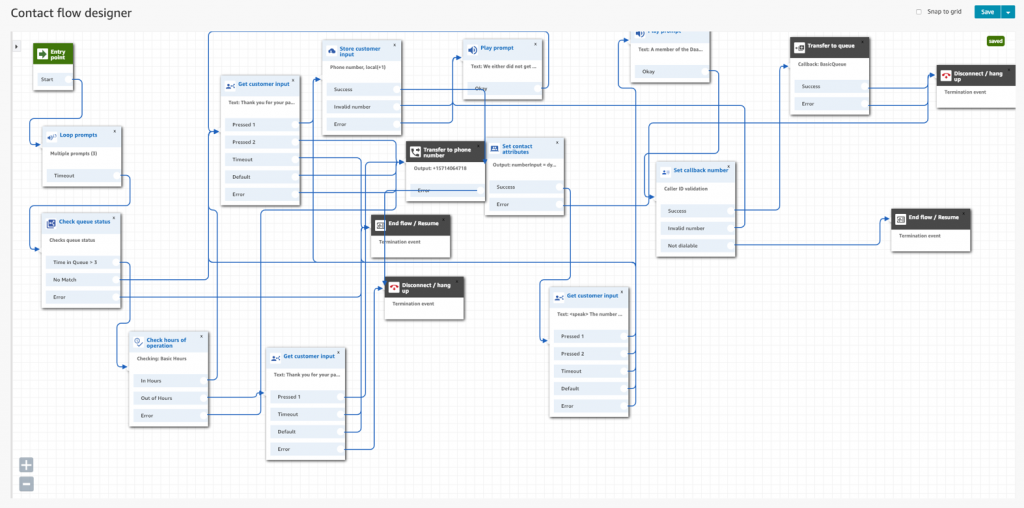
In the above call flow block, we invoke the lambda function when the caller selects that they want a call back from the on call team member. Lambda then interacts with PinPoint and SNS to send a canned message “an after hours caller needs help” sending both the message and the contact phone number to the SNS subscribers. This is a very effective solution for integrating SMS into your contact flows and is ideally suited to “on call” notifications.

Amazon Connect Configuration Best Practices – Part 2 Customer Queue Flow

Making the caller “comfortable” while waiting in queue for the next available agent is the primary role of a “customer queue flow”. Our standard practice is to provide a range of options that can be turned on or off as desirable for a specific CSQ. The main greeting contact flow discussed in Part 1 will attempt to hand the caller off to an available agent, but if none are available, the caller is moved to the customer queue flow.

The “customer queue flow” we typically provide does some initial setup and status checking:

  • Set Loop Prompts (Music and messages and time)
  • Check Queue Status
  • Check Call Back hours of Operation
  • Play EWT prompt
  • The Offer the Caller options (Wait, Voice mail and Call Back)

In our standard queue hold we check the queue status for “time in queue” of 3 minutes. We use this “poor mans” estimated wait time to provide an option to the caller if they are in queue longer than 3 minutes. We offer three options; continue to wait for next available agent, transfer to voice mail (or operator) and “call back”.

We also create a schedule for offering the call back option. When your call center closes at 5PM you may not want to offer the call back option after 4PM, so we check the schedule and if the caller is after the specified time in the schedule, we do NOT offer the call back but move to a block that only offers wait or voice mail.

DemoCustomerQueueHoldwithCallBack call flow download link

You must register on the Home page to download script

This contact flow also has the ability to prompt the caller to leave a call back number. This step requires some SSML in the text to speech block as we want to confirm the number the caller entered and give them an opportunity to correct any errors. First we prompt the caller to enter the phone number we should call them back at.

The Set Contact Attribute block is used to assign the callers input to a variable we can call on later in the flow:

In this example we are setting a destination key of “numberinput” and stuffing that variable with the system provided attribute “stored customer input”. It is important to set the destination key as any further use of this block will over write the stored information which you will need to reference later during the playback verification step.

This block reads the callers phone number back to them as an SSML object as illustrated above. Note that we reference the numberinput from the set contact attribute block as $.Attributes.

Amazon Connect Configuration Best Practices – Part 1 Main Greeting options

Every Call Center is in fact unique, but the all share a common theme that can be encoded for recreating deployments quickly. Generally we divide Contact flows up into manageable contact flows that compartmentalize call handling. For example we generally create a MainGreeting, QueueHandling and After hours Call Handling call flow and these three basic contact flow blocks provide some very powerful options!

Generally, we attach the incoming phone number to the MainGreeting Contact flow. This flow is very important as we use it to setup all the required variables required for whatever CSQ this greeting will front end. This contact flow will usually perform the following:

  • Set the voice to use for Polly based prompts
  • Enable Logging behavior
  • Enable Call Recording behavior
  • Set Agent Hold Behavior
  • Set Customer Hold Behavior
  • Set the Queue Hold Behavior
  • Set the Customer Queue
  • Set the whisper behavior
  • Set the Working CSQ
  • Invoke Lambda function to check for special closing
  • Check Operating hours
  • Prompt and Collect Caller Input
  • Transfer to Flow or Queue as required

These are all critical parts of the overall call flow and set the stage for call handling throughout the rest of this callers experience. Not burdening the the contact flow with all the queue options while awaiting connection with an agent, makes the flow more manageable!

If the caller can not immediately be routed to the next available agent, they are passed into the contact flow that describes the experience the caller has while waiting including the presentation of any options the caller might elect to initiate while holding.

DemoMainGreeting Contact Flow down load link!
You must register on the Home page to download the script

We will cover the Queue Hold options in the next post!

Amazon Connect Custom Integration tools!

If you have taken the time to experiment with AWS Connect and the creation of a cloud call center instance, you know that the basic setup is achievable by a business analyst and no implementation engineer is required. This is good news for very simple, inbound call centers but if you are planning to connect with the rest of the enterprise, you will need some folks skilled in full stake web service development.

No Call Center is an Island!

Call Center as a business process and customer experience management, require that the call center be able to communicate with other information resources throughout the enterprise. The interface between the AWS Connect call center instance and the rest of your organization will must certainly require both middleware and API’s that make use of advanced software development tools within AWS!

Common integration requests that dominate the call center technology space include:

  • Customer Routing Database Integration;
  • Work Force Management
  • Voice and Screen Recording and Playback
  • Voice Analytics
  • Salesforce.com
  • Electronic Health Record
  • Website Integration (think MyChart or CoBrowsing)
  • Microsoft CRM
  • Microsoft Skype for Business
  • Custom Agent dashboards
  • Real Time Metric display boards

These are just a few of the common requests we see on a daily basis. There are also unusual requests for custom solutions that are unique to the business enterprise the call center is deployed in!are also unusual requests for custom solutions that are unique to the business enterprise the call center is deployed in!

Common AWS Connect Integration Tools!

There are a few tools that are essential for developing integrations in AWS Connect. Generally, you will always require Lambda a “function as a service” to unite the call center to any other service. Lambda is “serverless” so you do not need to worry about setting up a server and you can write your function in any of the popular programming languages including Node.js our particular favorite!  Unless you are interfacing with a CRM, you will need a database and we would choose a noSQL solution like AWS DynamoDB, another server less solution.  Lets assume you want to route calls based on the callers area code, so that east coast calls go to the Agent group in your hierarchy that is optimized for east coast callers.  Maybe you want to greet your callers by name. This would require you to pass the Caller ID on an incoming phone call to a function in Lambda that would look up the customer and find the name, then pass the name back to the call center and activate Poly, the AWS text to speech service, so that you can prompt the caller with “Hi <customerName> before continuing to route the call to an agent!  Maybe you want to display the callers name to the Agent when they answer the call, which would again require both Lambda and DynamoDB in addition to some custom code!

Custom Agent Display?

Sometimes it is necessary to create an entire Agent dashboard to handle information displays, team collaboration, key metric broadcast, recording retrieval and playback.   We created the Dextr.Cloud dashboard to provide such an interface.  This is an example of the type of integration that is possible with AWS Connect and the many services that exist in the AWS Cloud.    We are interested in learning more about your own call center integration requirement and invite you to give Dextr.Cloud a try and also to contact us with your integration “’wish list’.   We have seen a lot of requests and nothing suprises us anymore!  So please feel free to play ‘STUMP THE VENDOR” and we will see if we can help you or at least direct you in the right direction!


Amazon Connect Arrange a Call Back from Queue?

Setting up options for Callers waiting in Queue for “the next available representative” often include offering a call back option. Generally, it is a best practice to not offer this option immediately but queue the caller for some time before offering this option. They have already called in and you have answered the call, so let them wait a few minutes before offering bail out options.

Common Call Flow Errors!

One of the most common errors in call center call flow planning is allowing a customer caller to queue for an Agent when no agents are logged in! The second biggest error, is leaving folks in the call back queue, at 5PM when all the agents log out and go home! So how do you do make sure this situation does not happen?

As it relates to the first issue, we always check to make sure that Agents are logged in BEFORE we queue a caller! This is a very simple step to do and it saves a lot of aggravation for callers who will never forget how long you left them rotting away in an empty queue!

Now as it relates to ‘call back’ without losing your place in queue, we have the same issue. Let’s assume that you offer callers this option. It is now 15 minutes before closing, what happens if all the agents log out before the call back is next in queue?

Call Back without losing your place?

In AWS Connect, Call Backs will follow the On-hours schedule. So if someone left a request for call back at closing time, that option will not trigger until the next day when the queue is open per On-hours. Lets see if we can improve this, but NOT offering that option late in the day!

We can setup a new schedule that only offers the call back between certain hours, so that if it is near closing, we do not offer the caller this option. This can be easily scripted in AWS Connect Contact Flows by adding a “check on-hours” step that eliminates this option when callers enter the queue and hour before closing time. This assures that Agents can log out at the appointed time and not leave anybody in queue!

AWS Connect is written around “contact flows” of different types. A “contact flow” handles inbound calls and routes them to Agents in queue. A “customer queue” contact flow deals with how to treat a caller while they are awaiting for the “next available representative”. You will learn this the hard way the first time you try to add a block to a contact flow and find that, though the block was there earlier, it is not there now! Why, the contact flow you are working on, does not support this type of block.

Free Call Back Script just for Asking

In this example we use a “Main Greeting” that is triggered by a call to the DNIS number associated with this path. We start the contact flow off by setting up all the variables like what voice to use, are we logging, what queue hold to use, which queue we are using etc. The flow goes on to check operating hours – routing ON- hours to the Queue and Off-hours to the Voice Message center.

If it is “On-hours” we send the call to the Queue flow. If an Agent is available, we connect them to the caller. If all agents are engaged with other callers, we queue the call. We play our “poor mans” Estimated wait time and then queue them with a “care message” followed by Music. 60 seconds later, we offer the option to continue to hold for an agent, or press 1 to receive a call back without losing your place in queue’.

Before we offer this option, we check another schedule that determines if we should offer the call back option. If the caller hits the center during the call back hours, the call proceeds as described above. If it is an hour before closing time, we do not offer the option.

So hit us up with a request and we will send you three “Quick Start” scripts that enable you to get this working as quickly as you can import the scripts into your AWS Connect call center instance.

Better yet – Give us a call and we will set this up for you!

Amazon Connect replaces ShoreTel Workgroups with the Dextr Dashboard!

Replace ShoreTel Workgroups with AWS Connect1

Recently we had a client with a very specific set of requirements and DrVoIP was able to satisfy with Dextr dashboard!   The client had a ShoreTel deployment that used ShoreTel Workgroups. ShoreTel Workgroups are often called a ‘poor man’s’ call center.  The client had made a decision too they were migrating away from ShoreTel to Skype for Business, they needed a new Call Center solution.  Workgroups act like traditional hunt groups but they enable customer queueing and both historical and real time reporting in a manner that is very similar to a formal call center.

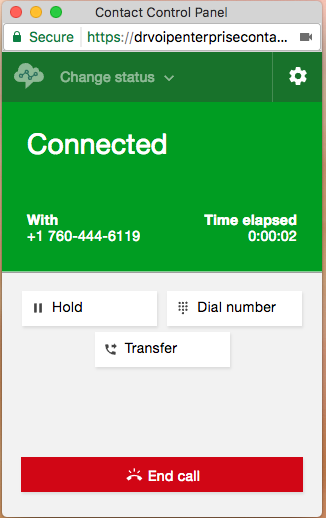
The client wanted to replicate ShoreTel Workgroups along with the same ‘look and feel’ as ShoreTel Workgroup agent dashboard.   This dashboard enabled queue monitoring and also enabled a supervisor to change an agent state from Forced release to available or move an agent between queues.   We had no doubt that AWS Connect was the ideal solution, but we knew the Connect Control Panel or CCP as AWS calls the webRTC soft phone, would need a lot of work if it was going to provide the same functionality as ShoreTel.


We created the basic Dextr Agent dashboard to have the same features and functionality as the ShoreTel Workgroup Agent interface with several new and advanced features.  We needed to create a solution that would enable Supervisors to create an ‘ad hoc’ meeting and to close the call center and even create a new ‘CLOSED’ greeting.   Additionally it would be desirable if the Supervisor could send a broadcast message to all the agents in the queue.  This broadcast message would scroll across the agents screen, alerting all to a situation that the Supervisor wanted to bring to the attention of all Agent.

AWS Connect Holiday Schedule.

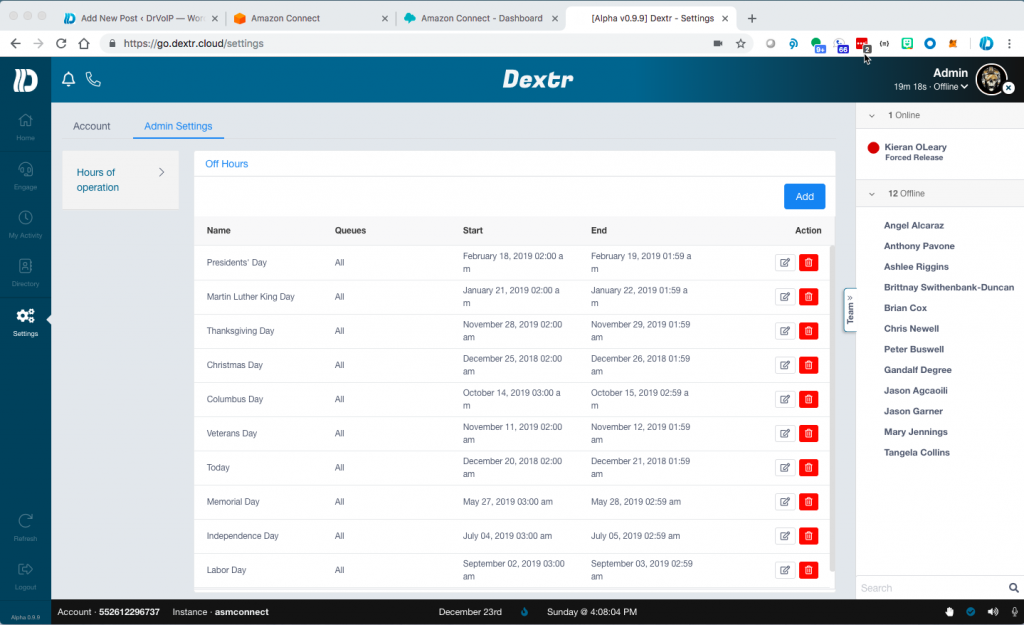
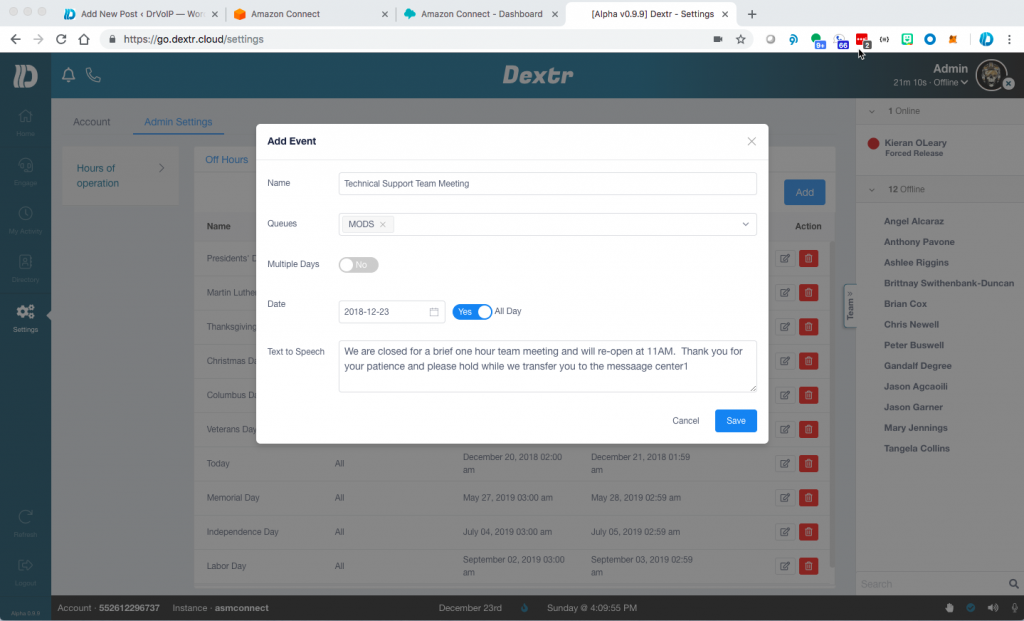
The first requirement was to setup a holiday schedule and also to allow the supervisor to create a ‘CLOSED FOR MEETING’ date and time.  AWS Connect does not have this ability out of the box, but it does have the API’s available to create such a solution.  So our team added this functionality!  Dextr enables a user with Admin privileges to open a window and create both HOLIDAYS AND AD HOC closings.   The instance is initially stocked with all US Federal holidays already listed.  The Admin can modify, add or delete these dates.  They can also specify, via the drop down window, which queues they are closing.  There is also a Text to Speech window in which the supervisor can enter the text of a prompt that will be played to a caller should they call during that time slot.

Dextr uses AWS Lambda to test for a holiday or ad hoc closing as step one in the opening contact flow.   The Lambda function brings back open or closed, a reason code and the text to speech prompt.   In this way the caller might hear ‘ You have reached us at a time we are closed for <insert reason from Lambda>, please hold while we transfer you to the message center’.   The entire message is created by the supervisor as the TTS or text block that will be returned by Lambda.

Dextr also enables the Supervisor to send out a broadcast message that scrolls for all queues or just a selected queue!  This is a list of all the features of the Dextr Dashboard basic version;

  • Nothing to install! Instant Access via https://go.dextr.com which has video instructions for on boarding;
  • Customizable Logo;
  • Role based Login (supervisor, agent, administrator)
  • SAML support;
  • Agent Team Status Display;
  • Agent Call Activity with (click to return call);
  • Directory System with Click to call;
  • Help Button – Alert Supervisor;
  • Queue Monitor – including calls in queue, max waiting time; optional red, yellow tags)
  • Personal Recording; (permission option);
  • Supervisor Permissions add: Login/Logout (change agent state) Monitor, coach and Barge in;
  • All Recording search and play (see note 1 below);
  • Real Time Metric review Report Generation
  • Ability to set Holiday Schedules and “ad hoc” closings with new close prompt (think team meeting).
  • Push Announcement String out to Agent Dashboard for alerts and other notices.

Dextr augments the basic AWS Connect CCP softphone to enable advanced features that we find most call centers demand!  See Dextr.Cloud or DrVoiP.COM for additional details!


Dextr a Customized Agent Dashboard for #Amazon Connect Call Center!

AWS Connect CCP

Building out call centers on AWS, you learn a lot about opportunities for productivity enhancements!   One of the first issues that we noted was that the standard Contact Control Panel or CCP, which is basically a WebRTC soft phone client, though very useful has many opportunities for improving the Agent experience.   The list of request features is growing and as a result, we have taken on the development of  a customizable AWS Connect Agent Dashboard!


Call DrVoIP for AWS Call Center migration assistance.

If your only introduction to AWS is Connect, their cloud based call center product, you have successfully created your first call center instance and you are now taking inbound phone calls!   It was remarkably easy and with no real ‘geek” training, most call center professionals were able to log in, setup an instance, organize a call flows, create agents and voice prompts, obtain a phone number an in a few hours, you were taking phone calls!  Wow!

AWS Demo API’s

Did you know that the Agent CCP is completely customizable?  AWS provides a number of API’s and Connect Streams that a software engineer can access toward the goal of building an Agent Dashboard with a set of features and tools that are unique to your call center environment.  There is even a site you can log into and test some of the available API’s.   If you go to http://connectdemo.com and click on the “demo sites” you can see some examples of customized CCP, Click to Call, Screen Pops and other tasty code bits.

Agent Streams

We note that there are many “connect streams” that a developer can tap to create their own version of CCP.   The supervisor side, however is not as fully formed and there are not as many streams and API’s available to support Supervisor requirements like real time queue and agent metrics.   In fact we had to develop our own socket layer communication strategy to implement the features we envisioned in our dashboard.

Recently we have discovered new and not readily available API for other AWS streams.  Some are only available depending on your support contract status.

Agent Dashboard Feature Set

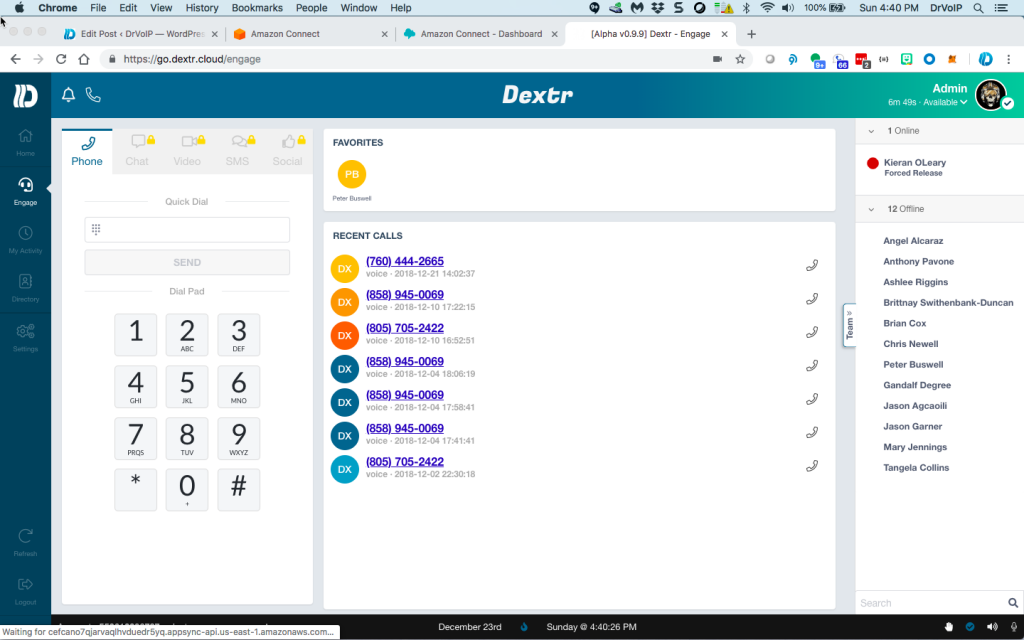
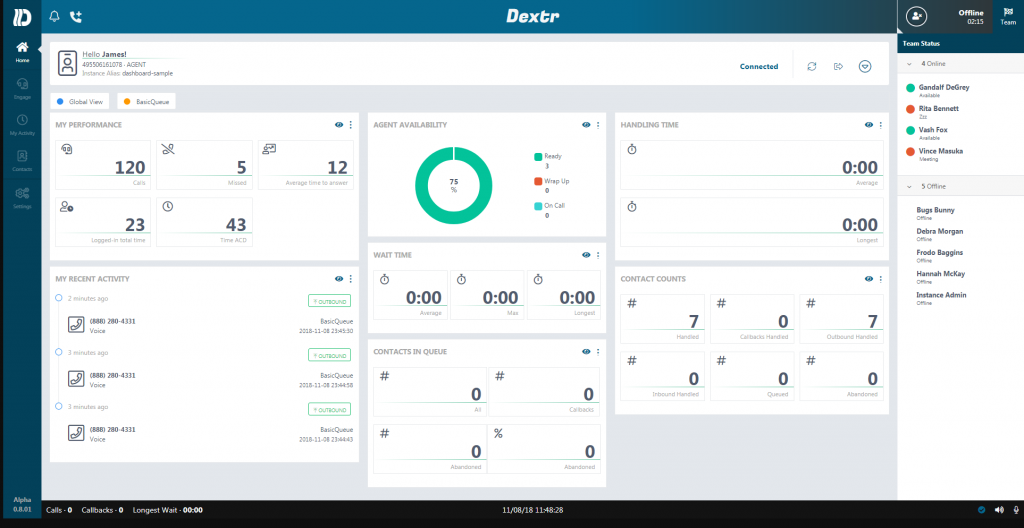
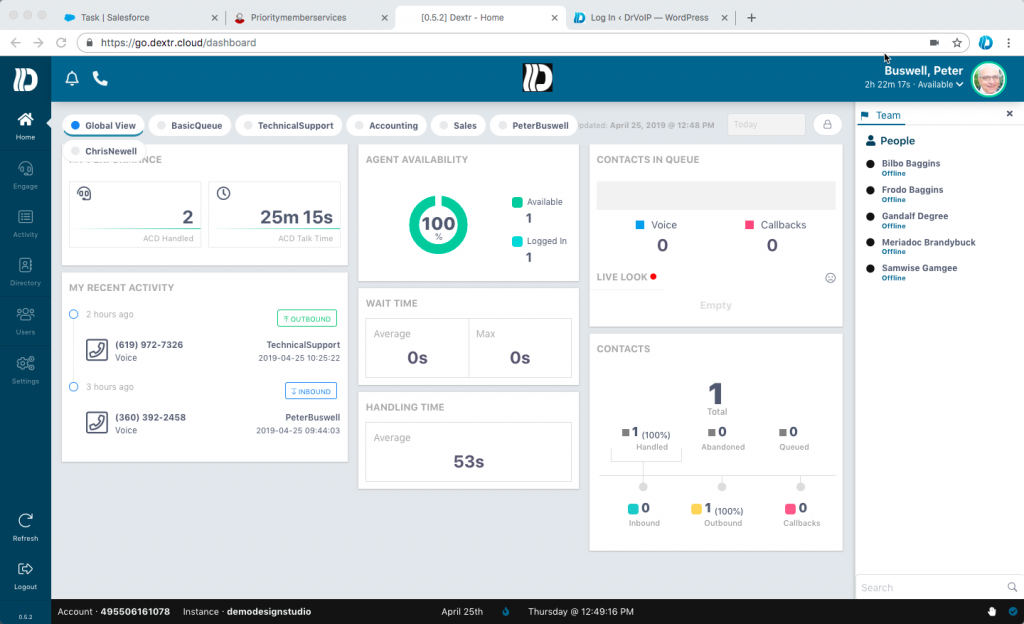
The list of functions and features that we have added to our CCP is still growing but we set a goal of making the dashboard painless!   For example there is nothing to install.  Our application needs to be added by your instance administrator as an application end point in the Connect dashboard.  Once that is complete, the user just points at our portal and enters their instance name (you can even upload your own logo).   The traditional AWS Connect CCP shows up and you login as normal.   Once your credentials are established, you are then presented with the revised Agent Dashboard as shown below.

AWS Connect Dextr Agent Dashboard feature set

Most folks have asked for a “team status” display.  As an Agent I want to see the status of the other agents on my team.  So the first attribute we added was just that, a team status display.    Each agent has their own Activity List showing all of their calls both inbound and outbound.   Next to each call is a link to hear the recording of that call. Supervisors can select all calls, but agents only see their own call recordings.

Each Agent has a personal contact list with contacts that they have entered for their own use.  This augments the “quick connects” that they system administrator had created.  Here is the feature list:

  • Nothing to install! Instant Access via https://go.dextr.com which has video instructions for on-boarding;
  • Customizable Logo and YourCompany custom log-in URL;
  • Role based Login (supervisor, agent, administrator)
  • SAML support;
  • Agent Team Status Display;
  • Agent to Agent Chat
  • Agent Call Activity with (click to return call);
  • Directory System with Click to call;
  • Help Button – Alert Supervisor;
  • Queue Monitor – including calls in queue, max waiting time; optional red, yellow tags)
  • Personal Recording; (permission option);
  • Supervisor Permissions add: Login/Logout (change agent state) Monitor, coach and Barge in;
  • All Recording search and play (see note 1 below);
  • Real Time Metric review Report Generation
  • Ability to set Holiday Schedules and “ad hoc” closings with new close prompt (think team meeting).
  • Push Announcement String out to Agent Dashboard for alerts and other notices.
  • Omni-Channel SMS/MMS enables test and pics to the next available agent
  • Omni-Channel email routing to the next available agent
  • “no headset” audible alert options for softphone

We are also planning to integrate or Click2WebChat functionality as an advanced feature option.  This would bring website co-browsing, video chat, SMS and keyboard chat into the call center!  The Dextr screen shows the Agent interface including the Video and Chat links.

How do you set a Holiday Schedule in Amazon Connect?

Dextr enables a user with Admin privileges to open a window and create both HOLIDAYS AND AD HOC closings.   The instance is initially stocked with all US Federal holidays already listed.  The Admin can modify, add or delete these dates.  They can also specify, via the drop down window, which queues they are closing.  There is also a Text to Speech window in which the supervisor can enter the text of a prompt that will be played to a caller should they call during that time slot.

We named the dashboard Dextr!  There is nothing to install.  Follow the video instruction below and have your Amazon Connect Administrator add us as a trusted application, then head over to our portal, log in and put Dextr to work for your team!

If you have a requirement for the CCP we would also like to know more about your requirements, so let us know.   If  you do not have an AWS Connect instance, DrVoIP will build you a “proof of concept” portal for no charge!  Remember, the American Business Communications landscape will be littered with the bleaching bones of those companies that do not adopt Amazon Connect as the enterprise call center that manages customer engagements!


The Achilles Heel of all Cloud Based Call Centers!

The Cloud Call Center Problem Statement!

A very common call center requirement is the ability to route a call based on the DNIS number dialed.  This is simple enough when you have only a few DNIS numbers to manage, but consider this application:   Consider a central call center that provides centralized appointment scheduling for some 600+ medical offices.    The call center agents are required to answer an inbound call with a custom answer greeting that is based on the medical office that cares for that patient.   The solution in place today requires the cloud platform to have a unique DNIS for each of 600 medical offices.  When a medical office wants to take advantage of services offered by the call center, they call forward their phone to the unique DNIS number on the call center platform assigned to their medical office.   On an incoming ring,  the call center grabs the DNIS and uses that number to index a connected database to retrieve the  name of the medical office and then display it to the agents on call presentation so they can provide the custom answer prompt.

As you might imagine, maintaining and updating both the relative campaign and a database of DNIS numbers is not only a nuisance with many opportunities for an error, it is also not very scalable.  The simplest solution is the ability to normalize or change SIP Headers or obtain the RDNIS in a PRI connection.   Neither of these is an option in any of the many cloud based solutions we have worked with.

The CPE solution!

In a CPE based solution we can touch the boarder controller of the incoming SIP trunk and see the various headers.   In a PRI trunk you could also see not only the CID/ANI  but the DNIS and the RDNIS.   RDNIS is commonly used in a voice mail system for example, to know the correct mailbox to open so the caller does not hear a main greeting but a custom greeting for the mailbox owner.   In either the SIP or PRI environment, we would NOT need 600 DNIS numbers to solve this application.   We could see the RDNIS or the FROM SIP header and use that field to look up the correct answer prompt or medical office name in the database.  We did a complete tutorial on this SIP header manipulation to achieve this same solution though the application was a bit different.

One for all and all for one?

Another major shortfall with cloud based call centers is that you will find it very hard to make modifications that are unique to your call center.  Keep in mind that all the cloud based call centers, with the possible exception of AWS Connect, are solutions that encompass many different clients.   The cloud provider can not make a modification for your call center unless it is applicable to all their other clients.  Likewise, when they upgrade or add a new feature, you are getting the new feature and the upgrade regardless of your desire to participate!

Summary

The Cloud is an amazing resource but it is not a one size fits all.  You will need to understand your requirements and how they match to what is generally available from your provider.  You should also understand that you will be increasing your WAN connectivity requirements to include advanced options like Software Defined Networks and MPLS, BGP along with bandwidth increases and new firewall challenges that you would not have on a CPE deployment.   You will still have phone and video end points, power over ethernet switches, network access credentials, intrusion protection and all of the IT resources you would still have with the Call Center located on site.  There are many advantages to the cloud, but make sure you know what you are hitching enterprise with!